Showing posts with label c#. Show all posts

Friday, August 1, 2008

Structure Inlining with .Net 3.5 SP1

I just stumbled on a fascinating performance improvement coming up in .Net 3.5 SP1.

When working with value types (structs) the JIT currently hits the stack each time you access a field - which is quite inefficient.

In SP1 they've added an algorithm called "value type scalar replacement"; which intuitively does exactly what it sounds like!

Take the following code:
static int MyMethod1(int v)
{
Point point; // gets a stack location.

// All 3 field accesses involve stack operations.
point.x = v;
point.y = v * 2;

return point.x;
}

The JIT will replace the value type (Point is a struct) with scalars:
static int MyMethod2(int v)
{
int x; int y; // Was “struct point;”. Now replaced by x and y.
x = v;
y = v * 2;

return x;
}

After the JIT inlines the structure, it can optimise the routine by placing the integers on the register rather than the stack.

What's the difference?

We are roughly looking at a 10x improvement! (Using a quick and dodgy test app)

This is fantastic, especially when dealing with lots of structs like points and rectangles etc.

What's the catch?

This isn't magically going to work on all your value types; there are strict guidelines when this replacement can occur:

- The value type must have no more than 4 fields

- These fields must be value types, or object references

- You must use [StructLayout(LayoutKind.Sequential)], which is the default anyhow.


There some other catches, but if you are creating complicated structures, you really should think about making them a class.

More Improvements

This is just a snippet of the algorithm, whereas the original article explains it in much more detail.

BTW: This is in the CLR, so all .Net languages benefit! And of course this includes F# and FParsec.

Cheers to SP1!

Wednesday, July 23, 2008

Advanced Domain Model queries using Linq - Part IV

This should be the last part in my series of posts.  In this part I'll cover support for parameters via method calls.

Parameter Support (Contrived Example)

Continuing the Library example, how would you query the books that will be overdue next week?

Well you could write the following:
var nextWeek = from a in repository.AsQueryable()
where a.CheckOverdue(DateTime.Today.AddDays(7))
select a;

How it works

The CheckOverdue Property simply returns a Lambda Expression as it's result.
class CheckOverdueProperty : QueryProperty<Loan, Func<DateTime, bool>>
{
public CheckOverdueProperty()
: base(x => y => (x.DateReturned == null && (y - x.DateBorrowed).TotalDays > x.LoanPeriod))
{ }
}

I've modified the expression parsing routines to support parameters (including multiple) and even nested lambdas!

Nested Lambdas?

I can't really see the need for it, but hey... why not! Curry anyone? :)
class MyProperty : QueryProperty<Loan, Func<int, Func<int, Func<int, double>>>>
{
public MyProperty()
: base(a => x => y => z => x + y + z + a.LoanPeriod)
{ }
}

So how would you call such a monstrosity?
var test = from a in repository.AsQueryable()
select a.MyProperty(5)(4)(3);

But check out the SQL! Great work Linq to Sql guys!
SELECT (CONVERT(Float,5 + 4 + 3)) + [t0].[LoanPeriod] AS [value]
FROM [dbo].[Loan] AS [t0]

Declaration Syntax

If you're particularly astute, you'll have noticed that my syntax for declaring a QueryProperty has changed slightly since the last post.

Here's the class declaration of the CheckOverdue Property:
[QueryProperty(typeof(CheckOverdueProperty))]
public bool CheckOverdue(DateTime date)
{
return CheckOverdueProperty.GetValue<CheckOverdueProperty>(this)(date);
}

Although this is a method, you can still define it as a property (notice that I return a lambda expression).
[QueryProperty(typeof(CheckOverdueProperty))]
public Func<DateTime, bool> CheckOverdue
{
get { return CheckOverdueProperty.GetValue<CheckOverdueProperty>(this); }
}

So What's Changed?

Well, QueryProperties no longer derive from an Attribute class.  Although it worked, I felt dirty about it.

I borrowed from Fredrik's syntax and pass the property type to the Attribute - much cleaner.

Since I'm no longer defining the QueryProperty as static, I had to change the way it is referenced by the class property.

The code above shows my attempt at making this easy, yet efficient - but it's up to you how to implement it.  E.g. this would work well too:
[QueryProperty(typeof(CheckOverdueProperty))]
public Func<DateTime, bool> CheckOverdue
{
get { return CheckOverdueProperty.Value(this); }
}

private static CheckOverdueProperty CheckOverdueProperty = new CheckOverdueProperty();

If you can think of better ways I'd love to hear it! 

Expression Parser

Since I posted the parser code in my last post, here it is again - and my has it grown!
class QueryPropertyEvaluator : ExpressionVisitor
{
// Basic member access support for QueryProperties
protected override Expression VisitMemberAccess(MemberExpression m)
{
if (m.Expression != null)
{
var property = GetProperty(m.Member);

if (property != null)
return Expression.Invoke(property.GetExpression(), m.Expression);
}

return base.VisitMemberAccess(m);
}

// Support method call abstractions over QueryProperties
// Assumes method call has same parameters (in order!) as QueryProperty
// Also supports static methods, as long as first parameter is the class object
protected override Expression VisitMethodCall(MethodCallExpression m)
{
Expression obj = this.Visit(m.Object);
IEnumerable<Expression> args = this.VisitExpressionList(m.Arguments);

var property = GetProperty(m.Method);

if (property != null)
{
if (obj != null)
{
// Method on QueryProperty class
return VisitLambdaInvocation(Expression.Invoke(property.GetExpression(), obj), args);
}
else
{
// Assumes static method where first parameter is object instance
return VisitLambdaInvocation(Expression.Invoke(property.GetExpression(), args.First()), args.Skip(1));
}
}

if (obj != m.Object || args != m.Arguments)
return Expression.Call(obj, m.Method, args);

return m;
}

// Support lambda expressions within QueryProperties
protected override Expression VisitInvocation(InvocationExpression iv)
{
IEnumerable<Expression> args = this.VisitExpressionList(iv.Arguments);
Expression expr = this.Visit(iv.Expression);

// Rewrite InvokeExpression - Folds out inner lambda
if (expr.NodeType == ExpressionType.Invoke)
return VisitLambdaInvocation((InvocationExpression)expr, args);

if (args != iv.Arguments || expr != iv.Expression)
return Expression.Invoke(expr, args);

return iv;
}


// Recursively 'flattens' the lambda invocation expressions
// Rewrites the nested lambda expression tree to work with Linq to SQL
protected Expression VisitLambdaInvocation(Expression expression, IEnumerable<Expression> args)
{
if (expression.NodeType != ExpressionType.Invoke)
return Expression.Invoke(expression, args);

var invoke = (InvocationExpression)expression;
var lambda = (LambdaExpression)invoke.Expression;

// Func<TClass, Func<Arg0, Arg1..., Result>> -> Func<TClass, Result>
var arguments = lambda.Type.GetGenericArguments().ToArray();
arguments[arguments.Length - 1] = arguments.Last().GetGenericArguments().Last();

return Expression.Invoke(
Expression.Lambda(
lambda.Type.GetGenericTypeDefinition().MakeGenericType(arguments),
VisitLambdaInvocation(lambda.Body, args),
lambda.Parameters),
invoke.Arguments);
}

#region MemberInfo caching

private Dictionary<MemberInfo, QueryProperty> lookup = new Dictionary<MemberInfo, QueryProperty>();

// This is not strictly needed, but adds a performance improvement.
// Feel free to remove this code if you think memory is more important
protected QueryProperty GetProperty(MemberInfo info)
{
QueryProperty result = null;

if (lookup.TryGetValue(info, out result) == false)
{
var attribute = Attribute.GetCustomAttribute(info, typeof(QueryPropertyAttribute)) as QueryPropertyAttribute;

if (attribute != null)
lookup.Add(info, result = attribute.GetProperty());
}

return result;
}

#endregion
}

Conclusion

As usual, here is the sample code for you to experiment with yourself.

I hope you've enjoyed this series, I certainly have. 


If I get the chance I might write a post explaining the expression parsing in detail, or the compiled queries - but till then...

Cheers!

Thursday, July 17, 2008

Advanced Domain Model queries using Linq - Part III

I didn't intend to post so quickly after my last post, but some comments from Nick motivated me to try something different.

So what's changed?

Not much.  Defining your query properties has changed (and obviously some implementation details).  All the linq syntax stuff stays the same.

Here's the same Loan class, rewritten:
class Loan
{
[OverdueFee]
public decimal OverdueFee
{
get { return OverdueFeeAttribute.Property.GetValue(this); }
}

[IsOverdue]
public bool IsOverdue
{
get { return IsOverdueAttribute.Property.GetValue(this); }
}

[DaysOverdue]
public double DaysOverdue
{
get { return DaysOverdueAttribute.Property.GetValue(this); }
}
}

And here's our query property definition:
class IsOverdueAttribute : QueryPropertyAttribute
{
public IsOverdueAttribute() : base(Property) { }

public static readonly QueryProperty<Loan, bool> Property = new QueryProperty<Loan,bool>(
x => (x.DateReturned == null && (DateTime.Now - x.DateBorrowed).TotalDays > x.LoanPeriod));
}

class OverdueFeeAttribute : QueryPropertyAttribute
{
public OverdueFeeAttribute() : base(Property) { }

public static readonly QueryProperty<Loan, decimal> Property = new QueryProperty<Loan, decimal>(
x => (decimal)(x.DaysOverdue * 0.45));
}

class DaysOverdueAttribute : QueryPropertyAttribute
{
public DaysOverdueAttribute() : base(Property) { }

public static readonly QueryProperty<Loan, double> Property = new QueryProperty<Loan, double>(
x => x.IsOverdue ? (DateTime.Now - x.DateBorrowed).TotalDays - x.LoanPeriod : 0);
}

What's the difference?

Well, depending on your programming tastes, it's cleaner.  We've reduced some of the tight coupling, and we now have the ability to spread the logic (which is more suitable in certain situations).

And if you're wondering why I seem to have an obsession with static members, it's mainly due to performance - and truth be told, I'm pre-optimizing here.  Generally I'm not such a fan... honest!

Performance anxiety

Speaking of performance, using Attributes has a penalty.  According to my tests, it's roughly 30% slower to parse the expression.  

This might sound like a lot, but we're talking about 0.37 vs 0.28 milliseconds per query here - and once you consider the database retrieval time... it's really nothing.

I don't even parse the expression tree with linq to objects - so no impact at all!

Bonus code (Expression Parser)

Here's my expression parsing code, I know you want to see it:
class QueryPropertyEvaluator : ExpressionVisitor
{
protected override Expression VisitMemberAccess(MemberExpression m)
{
if (m.Expression != null)
{
var attribute = Attribute.GetCustomAttribute(m.Member, typeof(QueryPropertyAttribute)) as QueryPropertyAttribute;

if (attribute != null)
return Expression.Invoke(attribute.Property.GetExpression(), m.Expression);
}

return base.VisitMemberAccess(m);
}
}

Beautiful isn't it!

Feedback please

If you've been following this little series, I'd love to hear what you think of the new syntax.

I'm still hesitant, since this new syntax results in more code - but I think it's a cleaner approach.


As usual, you can find the sample app here - enjoy!

Wednesday, July 16, 2008

Advanced Domain Model queries using Linq - Part II

Since my previous post I've rewritten the internals to make use of LinqKit - a fantastic lightweight project.

See the changes

I took my rewrite as an opportunity to support the full query syntax:
var overdue = from a in repository.AsQueryable()
where a.IsOverdue == true
select a.OverdueFee;

var days = repository.AsQueryable()
.Where(x => x.IsOverdue)
.Select(x => x.DaysOverdue);

and added easy support for compiled queries (currently only supporting linq to objects and linq to sql):
var query = repository.Compile(
source => from x in source
where x.IsOverdue == true
select x.OverdueFee);

var results = repository.Execute(query);

I've also optimized the expression parsing (speed difference is negligible to normal queries), and I tweaked the QueryProperty construction:
#region IsOverdue Property

public bool IsOverdue
{
get { return IsOverdueProperty.GetValue(this); }
}

static public readonly QueryProperty<Loan, bool> IsOverdueProperty = new QueryProperty<Loan, bool>(
x => x.IsOverdue,
x => x.DateReturned == null && (DateTime.Now - x.DateBorrowed).TotalDays > x.LoanPeriod);

#endregion

The big change here is that I've added an extra parameter; a reference back to the mapping property.

I'd really like a memberof(Loan.IsOverdue) keyword style syntax in C#, but since there's not, I use this expression to grab the MemberInfo - which is used in the expression parser.

It's a slight DRY drawback, but it's a faster way than using reflection (and avoids an ugly string lookup) - and it's much faster than using attributes.

Get the code

Most of the big changes are all implementation specific, so be sure to check out the sample app.

Please let me know what you think!

BTW: Joseph, I made some architectural changes to the LinqKit.ExpandableQuery stuff.  Externally it behaves exactly the same, but it now lets me reuse a lot more code.

It's light on the comments, but I'm hoping my next post will explain myself.


ed: Continue to Part III

Tuesday, July 15, 2008

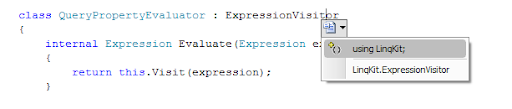
Ctrl . - My favourite shortcut

I'm a huge keyboard shortcut fan (for a windows developer)... for common tasks it's just annoying to have to grab the mouse.

For me, one such task was the rename / resolve support in Visual Studio:unresolved 
Using the mouse to bring up this dialog has got to be the most frustrating task in Visual Studio.

So much so, I refused to use it; instead opting for the right-click 'resolve' approach, or even manually typing in namespaces.

resolve

A few months ago, I stumbled on "Ctrl ." and to my delight ended my coding frustration.

I'm now more productive, less frustrated... do yourself a favour and give "Ctrl ." a go!

Monday, July 7, 2008

Advanced Domain Model queries using Linq

I read a fantastic blog article from Nick Blumhardt yesterday which kicked off some crazy ideas in my head.

The Problem

With the following class, I can query on IsOverdue using linq... but not using linq to sql (or linq to nhibernate).  How frustrating!
class Loan
{
// Member details omitted
public bool IsOverdue
{
get
{
return DateReturned == null &&
(DateTime.Now - DateBorrowed).TotalDays > LoanPeriod;
}
}
}

This is a fundamental issue in relational to object mapping systems, but we can fix it using some linq trickery.

Disclaimer

I think my solution is very cool, but I'm not sure how acceptable it is for a production environment. 

Please leave feedback if you like it / makes you want to vomit.

The change

Let's modify the Loan class implementation of IsOverdue:
#region IsOverdue Property

public bool IsOverdue
{
get { return IsOverdueProperty.GetValue(this); }
}

static public readonly QueryProperty<Loan, bool> IsOverdueProperty = QueryProperty.Register<Loan, bool>(
x => x.DateReturned == null && (DateTime.Now - x.DateBorrowed).TotalDays > x.LoanPeriod);

#endregion

Here we move the logic for IsOverdue into a separate QueryProperty member that takes care of the nasty details.

Hopefully you'll agree that the code is still fairly readable, and encapsulated with all the logic still bundled inside the Loan class.

By moving this logic into a lambda expression, we can now write queries for both database and object collections! e.g
// Database Access
using (var db = new RepositoryDatabase<Loan>())
var overdue = db.Where(y => y.IsOverdue && y.LoanPeriod == 5);

// Collection Access
using (var list = new RepositoryCollection<Loan>())
var overdue = list.Where(y => y.IsOverdue && y.LoanPeriod == 5);

More Goodness

When coding these query properties it can be very handy to reference other query properties. e.g.
#region DaysOverdue Property

public double DaysOverdue
{
get { return DaysOverdueProperty.GetValue(this); }
}

static public readonly QueryProperty<Loan, double> DaysOverdueProperty = QueryProperty.Register<Loan, double>(
x => x.IsOverdue ? (DateTime.Now - x.DateBorrowed).TotalDays - x.LoanPeriod : 0);

#endregion

#region OverdueFee Property

public decimal OverdueFee
{
get { return OverdueFeeProperty.GetValue(this); }
}

static public readonly QueryProperty<Loan, decimal> OverdueFeeProperty = QueryProperty.Register<Loan, decimal>(
x => (decimal)(x.DaysOverdue * 0.45));

#endregion

This allows us to create very complicated queries in a very simple manner.

The Catch

Too good to be true?  You're right; there's a devil in the details. 

You might have picked it up already - how does linq interpret my query property correctly?

By modifying the expression tree!

My Repository class implements the Where() and translates the expression; replacing any QueryProperty references with a call to the actual lambda expression.

The really ugly part is that it's a string based lookup ie. "<name>Property".  Though I also check the type to be extra safe.

It's really not a bad trade off, considering it's very similar to how WPF DependencyProperty's work.

The Conclusion

This is a really easy and seamless way to implement custom queryable properties in your domain objects.

I've only touched on a fraction of the possibilities with this technique, but it shows the power and flexibility of linq.

Make sure you check out the sample application for the full code.


ed: Continue to Part II

Friday, June 27, 2008

Loop optimization trickery

A while ago I was playing around with C# 3.5 lambda expressions trying to work out how it behaves with variable scope.

What do you think is written to the console?
class Program
{
static void Main(string[] args)
{
// Write number to console in worker thread
for (int i = 1; i < 9; i++)
DoLater(() => Console.Write(i));
}

// Call action delegate on separate thread
static void DoLater(Action action)
{
// I'm avoiding using another lambda here to simplify test
new Thread(new ParameterizedThreadStart(DoLater)).Start(action);
}

// Calls the action after waiting for a second
static void DoLater(object action)
{
Thread.Sleep(1000);
((Action)action)();
}
}

If you initially guessed (like me) that it displays the numbers 1-9 in some random order (eg. '14385726') - you'd be wrong...   it actually produces '999999999' every time.

So I cranked up .net reflector (I love it) and had a look at my code (optimization set to .NET 1.0 - then translated by me):
private static void Main(string[] args)
{
AutoDelegateClass tmpVar = new AutoDelegateClass();
tmpVar.i = 1;
while (tmpVar.i < 9)
{
DoLater(new Action(tmpVar.Method));
tmpVar.i++;
}
}

This is much more obvious...  .net optimizes the lambda expression out of the loop!

Well that was unexpected, but guess what happens when I change main to this:
static void Main(string[] args)
{
for (int i = 1; i < 9; i++)
{
int j = i;
DoLater(() => Console.Write(j));
}
}

This works! ie. it does not optimize the lambda expression out of the loop.


Although confusing at first, it actually makes a lot of sense from the compiler point of view - the initial expression doesn't actually change, since we are referencing a mutable variable... so why not optimize it?

It might be convenient to turn off this optimization programmatically - kind of like a volatile keyword or something, but it's no big deal.

I guess it goes to show that functional code works best with immutable data... and that reflector is way cool.


BTW: The exact same thing occurs in foreach over a collection; and also using classes rather than structs.

Tuesday, January 15, 2008

Deriving Miss Daisy

As I've mentioned previously, I'm slowly reading through SICP - it's an amazing book and reading it has been a humbling experience.

'Geeking' Out

I completely geeked out reading one example on functional derivatives.  (Take a math expression as a parameter and return the derivative as an expression)

It's in the first chapter, and they use this to implement Newton's Method -> to then implement a Sqrt function!

Approximate Derivative

After I picked my brain off the floor, I decided to have a crack at implementing derivatives in C# using lambda expressions:

derivative

Using the formula of a derivative (above), we can simply code an approximate derivative (below):

Func<double, double> Approximate(Func<double, double> f)
{
var h = 0.0001;
return a => ((f(a + h) - f(a)) / h);
}

Symbolic Derivation

Easy huh!  So for fun I decided to use linq expression trees to derive algebraically.

It's easy to get an expression tree in C# - simply use the Expression<> type.
Func<double, double> Derive(Expression<Func<double, double>> e)
{
var lambda = new Derivative().Eval(e) as LambdaExpression;
return (Func<double, double>) lambda.Compile();
}

I parse the expression tree using Matt Warren's ExpressionVisitor class - and using the basic rules of Derivation (Constant, Product and Quotient rules) we get:
class Derivative : ExpressionVisitor
{
public Expression Eval(Expression exp)
{
return this.Visit(Evaluator.PartialEval(exp));
}

protected override Expression VisitBinary(BinaryExpression b)
{
// Product Rule: (fg)' = f'g + fg'
if (b.NodeType == ExpressionType.Multiply)
{
return Expression.Add(
Expression.Multiply(Eval(b.Left), b.Right),
Expression.Multiply(b.Left, Eval(b.Right)));
}

// Quotient Rule: (f/g)' = (f'g - fg') / (g*g)
if (b.NodeType == ExpressionType.Divide)
{
return Expression.Divide(
Expression.Subtract(
Expression.Multiply(Eval(b.Left), b.Right),
Expression.Multiply(b.Left, Eval(b.Right))),
Expression.Multiply(b.Right, b.Right));
}

return base.VisitBinary(b);
}

// Parameter Derivation: f(x)' = 1
protected override Expression VisitParameter(ParameterExpression p)
{
return Expression.Constant(1.0);
}

// Constant Rule f(a)' = 0
protected override Expression VisitConstant(ConstantExpression c)
{
return Expression.Constant(0.0);
}
}

Wrapping it up

To quickly finish this long blog post, here's the usage code:
// f(x * x * x)' = 3 * x * x
var approx = Approximate(x => x * x * x);
var derive = Derive(x => x * x * x);

var y1 = approx(1); // 3.0000300001109532
var y2 = derive(1); // 3.0

And there it is!  Useful? maybe not.  Fun? Definitely!

Friday, December 7, 2007

MSDTC + Linq to Sql Update

When I was writing my previous article, I was keenly aware that it had it's limitations. One in particular was using an already open DataContext.

Take the following code:
// Create outside TransactionScope
var c1 = new UserDataContext();

using (var scope = new TransactionScope())
{
c1.Users.ToList();

// This will promote to MSDTC
using (var c2 = new UserDataContext())
c2.Users.ToList();

scope.Complete();
}
Since it was created outside the TransactionScope I have no way of automatically sharing these connections.

To help solve this problem (cleanly) I added a SharedConnectionScope class and a UseExistingConnection call (shown below) - both take an existing DataContext.
// Create outside TransactionScope
var c1 = new UserDataContext();

using (var scope = new TransactionScope())
using (SharedDataContext.UseExistingConnection(c1))
{
c1.Users.ToList();

// This will share existing connection
using (var c2 = new UserDataContext())
c2.Users.ToList();

scope.Complete();
}

Caveat: It only works with one 'external' connection, but that's still better than none.

You can grab the updated code here.

Thursday, December 6, 2007

Quick Application - Tickle Me Pink

colorsI do all my WPF coding in straight XAML, and for my prototypes I like to use the standard .Net colors.

So instead of playing a fun colorname -> color guessing game, I thought I'd have some fun and whip up this tiny color app (it's ridiculously easy in WPF). 

The following code is the entire application, it combines WPF, reflection, Linq and Anonymous Types.


UPDATE: Adjusted layout to look better in google reader.

<Window x:Class="Colors.ColorWindow" Title="Colors" 
xmlns="http://schemas.microsoft.com/winfx/2006/xaml/presentation"
xmlns:x="http://schemas.microsoft.com/winfx/2006/xaml"
xmlns:my="clr-namespace:Colors" WindowStyle="ToolWindow"
Height="500" Width="200">
<Window.Resources>
<DataTemplate x:Key="ColorTemplate">
<StackPanel Orientation="Horizontal">
<Border BorderBrush="Black" BorderThickness="1" Width="30" Height="30" Margin="10"
Background="{Binding Brush}" ToolTip="{Binding Brush.Color}" />

<TextBlock Text="{Binding Name}" VerticalAlignment="Center" />
</StackPanel>
</DataTemplate>
</Window.Resources>

<ListBox x:Name="colors" ItemTemplate="{StaticResource ColorTemplate}" />
</Window>
public partial class ColorWindow : Window
{
public ColorWindow()
{
InitializeComponent();

colors.ItemsSource = typeof(Brushes)
.GetProperties(BindingFlags.Static | BindingFlags.Public)
.Select(x => new {
Name = x.Name,
Brush = x.GetValue(null, null)
});
}
}

Monday, December 3, 2007

Avoiding MSDTC with Linq to Sql

Now MSDTC is not evil; it's just overkill when it isn't needed. It slows performance, increases complexity and requires client side configuration... and it can activate when you least expect it.

Take the following code:
void CreateUsers()
{
using (var scope = new TransactionScope(TransactionScopeOption.Required))
{
CreateUser("Fred");
CreateUser("Joe");

scope.Complete();
}
}

void CreateUser(string name)
{
using (var context = new UserDataContext())
{
context.Users.InsertOnSubmit(new User { name = name });
context.SubmitChanges();
}
}

This code uses the recommended (and very helpful) TransactionScope class - and unfortunately invokes MSDTC.

Since we're using separate instances of UserDataContext this creates separate database connections - and causes TransactionScope to "promote" the transaction to require MSDTC.

Avoiding this is as simple as sharing the database connection - after all, it is the same database - but passing database connections to sub methods gets ugly really quick.


My Solution

To solve this problem in a cleaner manner, I wrote a Transaction Resource Manager - which works behind the scenes and makes the above code work without change.

It simply shares database connections across the instances (only within a transaction). It's thread safe, and easy to integrate - simply change the DataContext base class in the dbml designer.


Grab the code and check it out. There's an example program and a whole slew of unit tests (around 275 - testing the various permutations of nested TransactionScopes).

Kudos to Nick Guerrea's Weak Dictionary - which I use to weakly track the transactions and share the connections.


Same Solution for other Scenarios

There are other scenarios where this problem arises:

Say you've got a database with many tables (or a plug-in system that shares a database) - a modular approach uses multiple DataContext classes.

Our problem occurs when you need to modify tables from different DataContexts within a single transaction.

Thankfully, the root cause is still the same and our solution solves these cases as well.


This has been a great learning experience for me, and I must say that the Transaction Resource Managers are very interesting (might even make a good alternate ScopeGuard implementation?)

EDIT: See updated article for extra goodness.

Wednesday, November 28, 2007

Quick Tip - Read Only Automatic Properties

This is a simple little trick, which I only discovered a few weeks ago.

In the past providing public "read only" access to a member would look something like:
private string connection;

public string Connection
{
get { return connection; }
}

With Automatic Properties in C# 3.5 the code becomes:
public string Connection { get; private set; }

The neat trick is the access modifier (private) next to the set. This allow you to internally modify the member, while publicly providing "read only" access.

Monday, November 26, 2007

VS2008 RTM Update

I have updated all the downloadable code to compile with the RTM release of VS2008.

It's not a big change, so I'll use this blog entry to update my Xceed <-> Linq code. I've fixed some minor bugs, improved performance a lot and added better linq syntax support.

So if you're using the code, it'd be a good idea to update.

Monday, November 19, 2007

IEnumerable Joy - Batch / Split

I was inspired by my good friend Nick's latest blog entry Return of the Batch Enumerable

Here he demonstrates a neat idea of using extension methods and yield to split an IEnumerable into arbitrary batches.

My version is slightly less efficient, but treats the batches as separate lazy collections - so you can use it on multiple threads etc.

I've also added a Split extension, which I'll describe - but first, the code!

static class InBatchesExtension
{
public static IEnumerable<IEnumerable<T>> InBatches<T>(this IEnumerable<T> source, int batchSize)
{
for (IEnumerable<T> s = source; s.Any(); s = s.Skip(batchSize))
yield return s.Take(batchSize);
}

public static IEnumerable<IEnumerable<T>> Split<T>(this IEnumerable<T> source, int items)
{
for (int i = 0; i < items; ++i)
yield return source.Where((x, index) => (index % items) == i);
}
}

The InBatches returns the same output as Nicks:

Batch: 1 2 3
Batch: 4 5 6
Batch: 7

And the Split batches the output across the collections:

Batch: 1 4 7
Batch: 2 5
Batch: 3 6

So this gives you 2 different batch splitting methods for a generic enumerable.

I love this stuff.

Tuesday, November 13, 2007

Wield the Yield

Recently I've noticed an IO pattern emerging combining yield and linq; a powerful and efficient mechanism to read data.

Check the following code: We safely open a file (with the using statement), and yield the results with a loop.
IEnumerable<string> ReadFile(string filename)
{
using (StreamReader reader = new StreamReader(File.OpenRead(filename)))
while (reader.EndOfStream == false)
yield return reader.ReadLine();
}

This simple (and beautiful) code allows us to treat a file like an array of strings - which becomes very powerful when coupled with linq.
// Contrived example - How many file lines refer to "fred"?
var result = ReadFile("file.txt").Where(x => x.Contains("fred")).Count();

I'm sure this same pattern could also be applied to other data retrieval methods, eg algorithm calculation (prime numbers, Fibonacci, etc), network communication (message queue) and even as an abstraction over asynchronous data methods.

Yield provides a lazy enumeration (doesn't execute unless needed) so the solution is generic and efficient - I like it.

Monday, November 5, 2007

n! - let me count the ways

The other day I had an interesting discrete maths assignment question involving permutations - so I decided to codify it.

"How many ways can six people (Josh, Toby, CJ, Sam, Leo & Donna) sit, if Josh must sit to the left of Leo and to the right of Sam."

Now the astute reader will immediately recognize the answer to be 2 * (4! + 3!3!) = 120; but to be sure I wanted to double check this via C#. (I'm keen to redo this in F# too)

My solution was a quick hack, and is by no means "the best way" - but using linq it sure looks pretty.

class Program
{
static IEnumerable<List<string>> Permutate(IEnumerable<string> people,
IEnumerable<string> current)
{
// Get remaining people and recurse
foreach (var person in people.Where(x => current.Contains(x) == false))
foreach (var result in Permutate(people, current.Concat(new string[] { person })))
yield return result;

if (current.Count() == people.Count())
yield return current.ToList();
}

static void Main(string[] args)
{
string[] people = new string[] { "Josh", "Toby", "CJ", "Sam", "Leo", "Donna" };

var result = Permutate(people, new string[] { }).ToList();

// Josh sits to the left of Leo
var Josh_Leo = result.Where(r =>
r.FindIndex(x => x == "Josh") < r.FindIndex(x => x == "Leo"));

// Josh sits to the right of Sam
var Sam_Josh = Josh_Leo.Where(r =>
r.FindIndex(x => x == "Sam") < r.FindIndex(x => x == "Josh"));

var count = Sam_Josh.Count();
}
}

This simple example shows why I'm a such fan of linq in C# - the pre-linq code for this certainly wouldn't be as eloquent.

Oh, and it also shows why I'm a fan of maths... it's much more efficient to just to calculate the factorials.

Update: Formatting code in a blog sure is a pain!

Thursday, September 27, 2007

Updatable, inheritable, WPF bounded Linq queries

This is part 4 of my "binding Linq to Xceed's data grid" blog series; however I've changed direction dramatically.

Skipping the details, heres the code binding to a linq query:

users.LinqContext = new UserDataContext();

users.ItemsSource = from i
in users.DataSource<User>()
select i;


And this code fully supports inserts/updates/deletes.

The implementation lives inside the DataSource<User>() call. This devious character returns a reference to a IBindingList (which supports the table modifications) and implements IQueryable (to support linq queries).


What about inheritance?

Imagine you had a sub class called SuperUser; if you've played with linq inheritance you'll know that you have to use the base type User to actually do anything. It's kind of a pain, and you get real friendly with the .OfType<>() call.

So here's the code again, this time selecting all SuperUsers.


users.ItemsSource = from i
in users.DataSource<User, SuperUser>()
select i;


Can I use .Take(x)?

As far as I can tell, all the standard linq statements are supported (including aggregate operators). I haven't looked into partial classes and anonymous types, though I doubt they'd work well.


I won't go into the laborious details of how it's all implemented, just know that it's been fun playing with linq expression trees and writing my own IQueryProvider.

If you are interested, the code can be found here.

I haven't seen anything quite like this out there, so if you have some opinions - I'd love to hear some feedback.

Monday, September 24, 2007

Linq Table and GetNewBindingList()

While I'm talking about binding linq data tables to WPF, I should mention the simplest method, namely Table.GetNewBindingList();

This method allows you to add/insert/update (even with Xceed's grid) quite easily, but does not save implicitly, ie. you have to manage it yourself.

If you prefer to batch up all your changes and save en mass at a special point (this is a common UI pattern) - then this might be a great solution for you.


One issue with with approach however, is that it only supports the whole table, ie. not based on queries. This might be fine if you are using the WPF's data filters, but it's not an optimal result with large amounts of data.


I'm planning to investigate these two aspects in the near future, and hopefully I'll find an elegant solution.

Friday, September 21, 2007

Linq with Xceed's WPF Grid - Part III - Hooking up the Delete

One of the under appreciated features of WPF is its Command support. This feature allows you to hook up events in a more abstract and loosely coupled way; with a great collection of common actions provided by default.

To hook up delete functionality from Xceed's data grid to a Linq data table, I took advantage of these Command gems and as you will see, they make things very easy to use.

The provided ApplicationCommands.Delete command, comes with a localized string ("Delete") and associated key bindings ("Del" Key).

Handling this command in the LinqGrid is as simple as calling the following in the initialization routines:

CommandBindings.Add(new CommandBinding(ApplicationCommands.Delete,
OnDeleteCommand, OnCanDeleteCommand));


Implementing the OnCanDeleteCommand to return true, if any items are selected and the OnDeleteCommand to delete the selected items, and it's done! Well almost.

Automatically deleting the selected items (with the "Del" key) without any warning is usually not the best behaviour, so I implemented a RoutedEvent called PreviewDelete, which allows you to show a message box and/or cancel the delete.

Show me the XAML

Another great benefit of using Commands is the ability to bind other UI elements as the action co-coordinator for the command. i.e Buttons, Context Menus, etc.

Not only is this clean and easy, but it also has built in routines to control the IsEnabled state. ie. Button is disabled if you cannot currently delete.


<Button Command="Delete"
CommandTarget="{Binding ElementName=users}"
Content="{Binding Command.Text, RelativeSource={RelativeSource self}}" />


The "Command" is quite simply a reference to the ApplicationCommands.Delete command, while the "CommandTarget" is the name I gave to my LinqGrid.

The unfortunately long "Content" attribute is the Buttons label, bound to the Command itself. Remember how I said the provided commands have localized names... this is how you access them in XAML. Thankfully, this is also purely optional.

This is all you need to do. When the button is pressed, the Command is fired and our LinqGrid performs the delete, first checking with PreviewDelete for its permission.

Download the sample solution for the full code.